timeseries-qc
The open source data quality-control layer for SCADA, DCS, IoT, and historian time-series data.
Add good / suspect / bad quality labels to every row of a pandas DataFrame in five lines. Then render a multi-tag horizontal status timeline — the chart that no other open-source library produces.





Quickstart
import tsqc
import pandas as pd

df = pd.read_csv("sensor_data.csv")          # columns: timestamp, tag_name, value
result = tsqc.check(df, assume_tz="UTC")     # assume_tz required for tz-naive CSVs
result.plot().show()                          # renders the multi-tag quality timeline
That's the entire API. check() returns a QCResult with all downstream methods.
Get Started → Installation Guide → Traffic Dashboard → View on GitHub →
Features
Built-in Rules
Null, Flatline, Delta, Range, and Outlier rules cover the majority of real-world sensor faults. Custom rules accept any callable. Learn more about rules →
Timeline Chart
Plotly horizontal Gantt chart with one row per tag, color-coded by quality, interactive hover, and range selector. See visualization guide →
External Quality Column
Use a pre-existing historian quality column exclusively or merged with internal rules. Supports exclusive/combined/none modes. SCADA integration guide →
Timestamp Health
Detects gaps, duplicates, non-monotonic timestamps, frequency drift, and DST ambiguities. Timestamp validation docs →
YAML Configuration
Write rules in a plain text file. No Python required. Glob patterns supported for tag matching. View YAML guide →
Offline HTML Report
Self-contained export with embedded Plotly chart, summary tables, and per-issue breakdown. No CDN needed.
Pandas Native
Works with any DataFrame containing timestamp, tag_name, and value columns. Single-tag mode supported.
Quality Labels
● good ● suspect ● bad
When multiple rules fire, the worst level wins: bad > sus > good. Triggered rule names appear in a pipe-delimited quality_reasons column.
Example Output
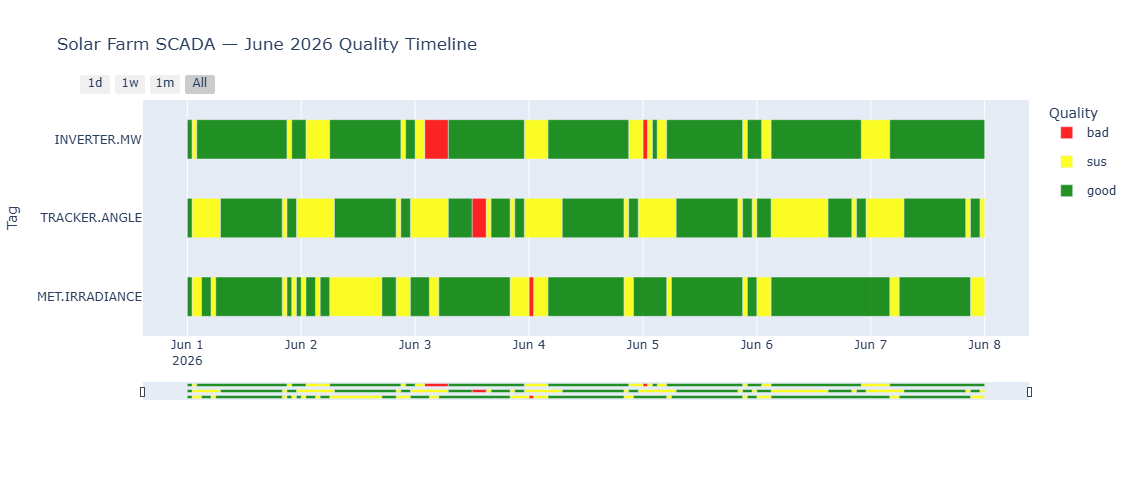
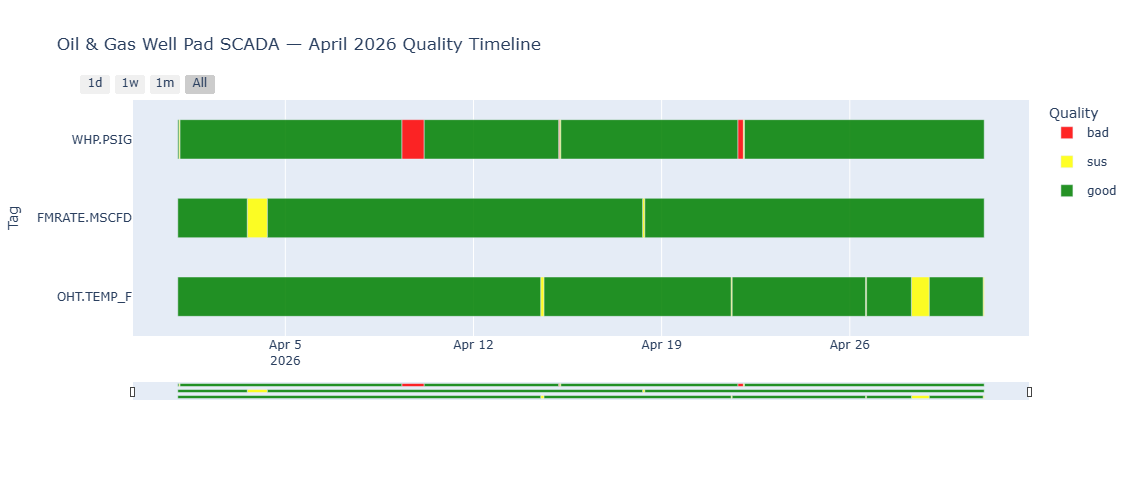
Input & Output
Input
| Column | Type | Notes |
|---|---|---|
timestamp | datetime | UTC-aware or tz-naive (pass assume_tz) |
tag_name | str | Sensor identifier. Omit column or pass tag_col=None for single-tag mode. |
value | float | The measurement to check. |
Output
result.df adds two columns to the original DataFrame:
| Column | Values | Notes |
|---|---|---|
quality | "good", "sus", "bad" | Worst-level rule wins |
quality_reasons | e.g. "flatline\|range" | Pipe-delimited triggered rule names |
YAML Config
# tsqc_rules.yaml
default_rules:
  - check: null
    level: bad
  - check: flatline
    window: 1h
    min_delta: 0.001
    level: sus
  - check: delta
    max_delta: 50.0
    level: sus

tag_rules:
  "FOREBAY.LEVEL":
    - check: range
      min: 900
      max: 1100
      level: bad
  "GENERATOR.*":
    - check: range
      min: 0
      max: 200
      level: bad
    - check: flatline
      window: 30min
      min_delta: 0.5
      level: sus
result = tsqc.check(df, rules="tsqc_rules.yaml")
result.summary()           # DataFrame: pct_good/sus/bad per tag
result.issue_summary()     # DataFrame: per-issue runs (start, end, rows, duration, reasons)
result.check_timestamps()  # DataFrame: gap/duplicate/non_monotonic issues
result.export_report("report.html")  # Full HTML with chart + all tables
External Quality Column (v0.4.0)
Use a pre-existing quality/status column from your SCADA historian alongside or instead of internal rules:
| Mode | Behavior |
|---|---|
exclusive | External quality only; no internal rules run |
combined | External + internal merged (worst-wins: bad > sus > good) |
none | Internal only; ignores external column (escape hatch) |
result = tsqc.check(df, external_quality_col="status", quality_mode="combined",
                     quality_map={0: "good", 1: "sus", 2: "bad"}, assume_tz="UTC")
See the User Guide for full details.
Comparison with Alternatives
| timeseries-qc | Pecos | SaQC | Great Expectations | |
|---|---|---|---|---|
| Classification | Good / Sus / Bad | Pass / Fail | Flags | Pass / Fail |
| Timeline chart | Yes | No | No | No |
| YAML config | Yes | No | JSON | No |
| Time-series native | Yes | Yes | Yes | No |
| License | MIT | BSD-3 | LGPL | Apache-2.0 |
Pecos (Sandia Labs) offers binary pass/fail and has been in maintenance mode since 2021 — no timeline chart and no YAML config.
SaQC (Helmholtz UFZ) is a rich flagging engine for environmental science but has an environmental-domain API, no timeline visualization, and an LGPL license.
Great Expectations is not timeseries-native and produces no visualization.
timeseries-qc is the only library that combines (1) Good/Sus/Bad classification, (2) the multi-tag horizontal status timeline, and (3) YAML-driven configuration in a single pip install.
Known Limitations (v0.5.0)
- Pandas only. PySpark and Polars support are planned.
- No YAML override of default rules. Tag-specific rules add to, not replace, default rules.
- Visualization requires Plotly ≥ 5.0. Matplotlib output is not yet supported.
Next Steps
Run your first quality check in 5 lines.
Run the full workflow interactively with synthetic SCADA data.
Real-world code for solar, oil & gas, manufacturing, and more.
Complete walkthrough of all features and capabilities.
Configure rules without writing Python code.
Full documentation for every function and method.
See how we compare to alternatives like Pecos and SaQC.
Get help, share projects, and contribute.
Source code, issues, and contributions.